Step 1 of 9
Choose your mount from the Life In The City pack.








Prices change straight away. Every language is our own translation, not Google.
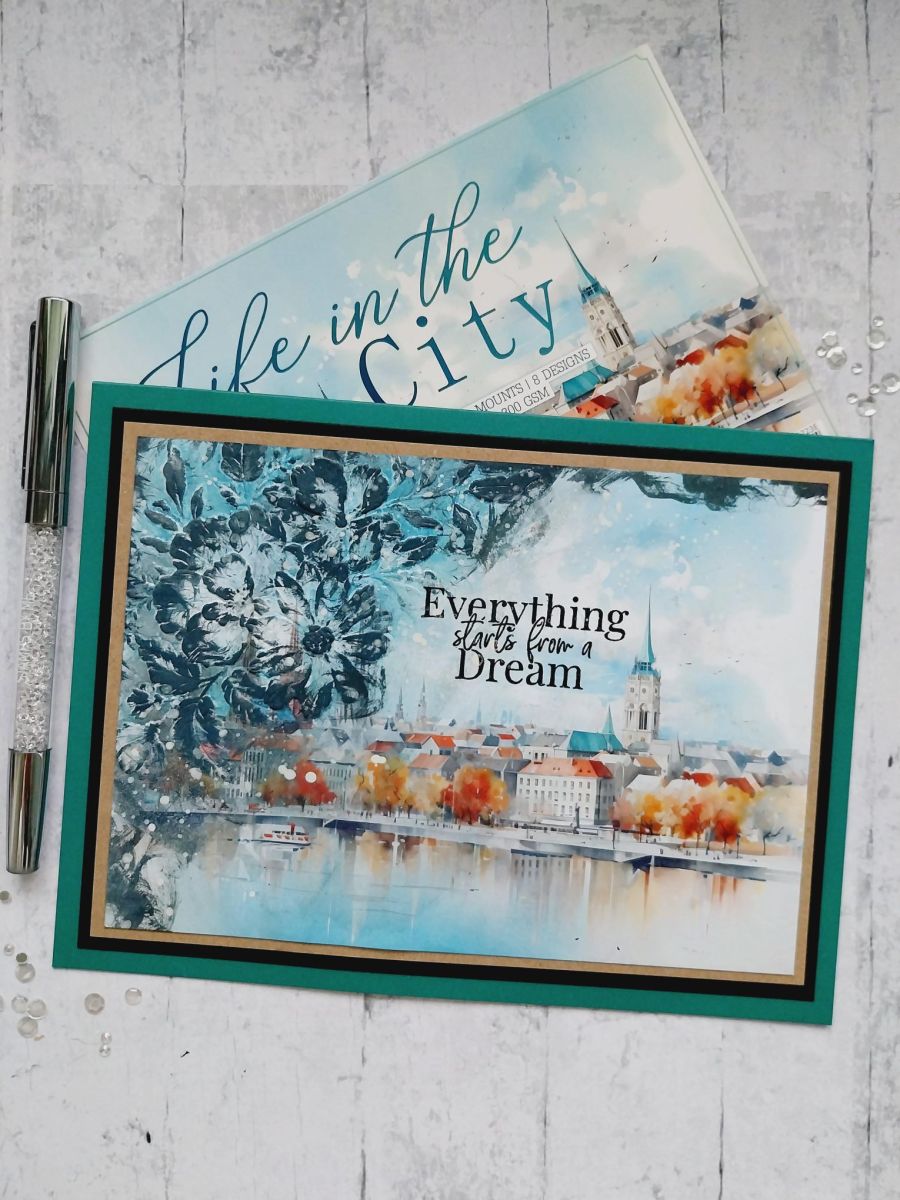
Choose your mount from the Life In The City pack.
Ink the debossed side of the Wild & Beautiful embossing folder with the Distress inks and spritz lightly with water.
Place over the top left corner of the painted mount and run it through your embossing machine.
Swipe your Black Soot ink pad lightly over the outer areas of the embossed design until you are happy with the effect achieved. Dry thoroughly with a heat tool.
Pounce your white Cotton ink pad over the raised areas as required. This helps the focal areas "pop" out from the darker inks.
Go back in with Black Soot to intensify areas as required then dry with heat tool.
Splatter with the White Lace Confetti ink and dry.
Stamp your chosen sentiment in Midnight, top left of your artwork.
Mat onto kraft card cut to 5 1/4 x 7 1/4" and then onto black card measuring 5 1/2 x 7 1/2". Finally, mat onto your landscape teal card blank.
Share your make with the Stamps By Me community - and keep this guide for next time.
Prefer the previous layout? Open the old page.